> For the complete documentation index, see [llms.txt](https://docs.slerf.tools/llms.txt). Markdown versions of documentation pages are available by appending `.md` to page URLs; this page is available as [Markdown](https://docs.slerf.tools/bsc-zh/token-management/token-creator.md).
# 标准代币创建教程
在 BSC 等 EVM 网络无代码创建标准代币:连接钱包,填写名称、简称、发行量与精度,确认交易后通过合约地址和交易哈希核对结果。
> **创建 BSC 代币 | BNB 一键发币 | 快速、简单且便宜**
>
> 安全便捷,一分钟快速在 BSC 上创建代币,无需任何编程,一键发行您的 BNB Chain 代币!
>
> 👉[立即体验>>>](https://slerf.tools/zh-cn/token-creator/bsc)
{% hint style="info" %}
**提示:** 本教程演示截图基于 **BSC (BNB Chain)**。
**💡** SlerfTools 是全链通用的,如果您在 **Base / ETH / X Layer / Plasma /** **Monad /** **Polygon** 等链上操作,**步骤完全一致**。
请确保您的钱包(OKX / MetaMask 等 Web3 钱包)已切换到目标网络即可。
{% endhint %}
#### 如何创建 BSC 标准代币:
1. 连接钱包
2. 填写代币信息
3. 选择创建代币
4. 查看代币详情
#### 准备事项:
* 一台电脑或者一部手机
* 支持 BSC 的钱包([OKX 钱包新手教程](/bsc-zh/general/okx-wallet-guide.md))
* 钱包至少准备 **0.05 BNB**(用以支付 Gas 和服务费等)
* 项目代币相关信息
#### 具体步骤:
1. **连接钱包**
选择并连接需要操作的钱包,SlerfTools 目前支持多种 Web3 钱包,如 MetaMask、OKX 钱包等。
**BSC 创建普通代币:** [**https://slerf.tools/zh-cn/token-creator/bsc**](https://slerf.tools/zh-cn/token-creator/bsc)
语言设置:进入页面,右上角支持切换多语言。
2. **填写代币信息**
* **代币全称**:您希望展示在钱包或区块浏览器中的完整代币名称(*例如:BNB Chain*)
* **代币简称**:代币的缩写,通常为 3\~6 个大写字母(*例如:BNB*)
* **发行量**:代币的总供应数量(*例如:1,000,000,000*)
* **精度(小数位数)**:决定代币最小可分单位,常见为 18 位,类似于 ETH 的最小单位 Wei
3. **创建代币**
点击【创建代币】,钱包签名确认,等待代币创建完成。
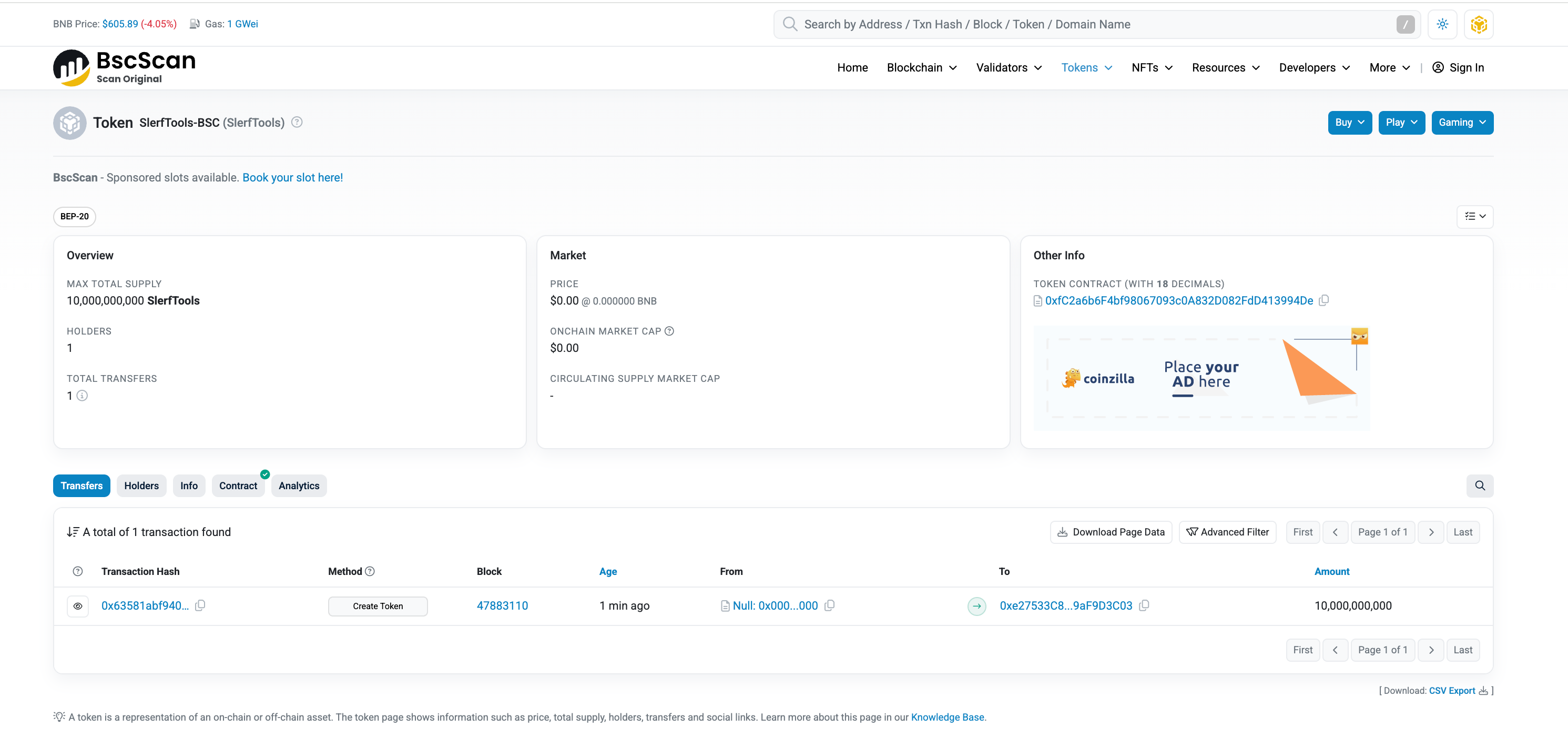
4. **查看代币详情**
* **创建代币合约**:0xfC2a6b6F4bf98067093c0A832D082FdD413994De
* **链上 HASH**:
{% hint style="info" %}
### 使用**批量交易工具加速市场参与**
【[**批量生成钱包**](https://slerf.tools/zh-cn/wallet-creator/bsc)】:快速创建大量钱包,满足大规模交易需求。
【[**批量转账**](https://slerf.tools/zh-cn/multi-sender/bsc)】:批量发送代币,一次交易高效发送到多个钱包,提高资金管理效率。
【[**创建流动性并买入**](https://slerf.tools/zh-cn/create-liquidity-and-buy/bsc)】:创建流动性池的同时进行代币买入操作,100%最早买入,快人一步,掌握市场先机。
{% endhint %}
***
#### *SlerfTools 联系我们*
*如有任何疑问或商业合作意向,请通过邮箱联系我们:\[*[*BD@slerf.tools*](mailto:BD@slerf.tools)*]*
#### *SlerfTools 社交链接*
*Twitter:*[*https://twitter.com/SlerfTools*](https://twitter.com/SlerfTools)
*Telegram:*[*https://t.me/SlerfTools*](https://t.me/SlerfTools)
*Gitbook:*[*https://docs.slerf.tools/*](https://docs.slerf.tools/)
*Github:*[*https://github.com/slerfTools/slerfTools*](https://github.com/slerfTools/slerfTools)
*Medium:*[*https://slerftools.medium.com/*](https://slerftools.medium.com/)
*YouTube:*[*https://www.youtube.com/@slerftools*](https://www.youtube.com/@slerftools)
> ***免责声明**:*
>
> *SlerfTools保留随时全权酌情因任何理由修改、变更或取消此公告的权利,无需事先通知。以上信息内容仅供参考,SlerfTools对本平台上的任何虚拟资产、产品或促销活动不做任何推荐或保证。虚拟资产的价格波动很大,投资交易虚拟资产将面临巨大风险。请谨慎投资。*
---
# Agent Instructions
This documentation is published with GitBook. GitBook is the documentation platform designed so that both humans and AI agents can read, navigate, and reason over technical content effectively. Learn more at gitbook.com.
## Querying This Documentation
If you need additional information that is not directly available in this page, you can query the documentation by asking a question.
Perform an HTTP GET request on the following URL with the `ask` and `goal` query parameters:
```
GET https://docs.slerf.tools/bsc-zh/token-management/token-creator.md?ask=&goal=
```
`ask` is the immediate question: it should be specific, self-contained, and written in natural language.
`goal` is what the user is ultimately trying to achieve, the reason they need the answer. Sharing it helps GitBook give you a better, more relevant answer. A goal is most helpful when it describes the outcome the user wants rather than restating the question. For example, with `ask=how do I create an API token`, a goal like `automate deployments from our CI pipeline` lets GitBook tailor the answer to that use case.
The response will contain a direct answer to the question and relevant excerpts and sources from the documentation.
Use this mechanism when the answer is not explicitly present in the current page, you need clarification or additional context, or you want to retrieve related documentation sections.